HotSchedules
- 3.5
- Rating
- 1.00M
- Installs
- $2.99
- Price

 Analysis by App-foxy
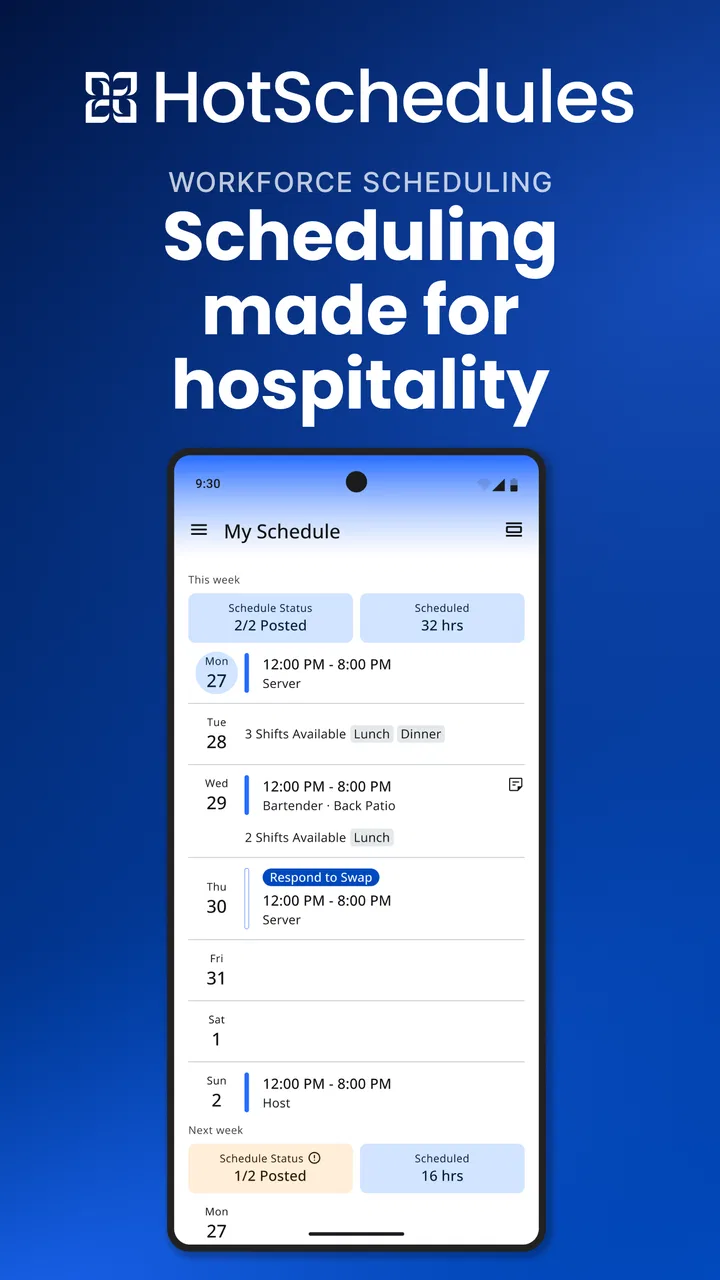
HotSchedules is the kind of productivity app that makes the most sense when your working day is built around changing shifts rather than a fixed desk calendar. I found its purpose easy to understand: it brings a restaurant or hospitality schedule into a phone-friendly routine, where checking upcoming work, planning personal time, and staying aware of changes can happen between errands instead of only at a computer. It is not a general task manager pretending to solve every work problem. Its value comes from focusing on the practical rhythm of scheduled shifts.
That focus also explains why connectivity matters so much to the experience. A schedule is useful only when the information on screen reflects the latest version, and a shift-related change can be more important than a dozen ordinary notifications. I would therefore treat this as a connected work tool first, not as a calendar that I expect to behave identically without a network. When the connection is good, the app can fit naturally into a quick check before leaving home or while deciding whether I can accept another commitment.
How HotSchedules fits into a working day
Fourth Enterprises, LLC is the developer behind this productivity app, which has been available since August 17, 2010. That long presence gives the product a more established feel than a brand-new scheduling experiment, while the current version, 5.26.1, shows that it remains maintained as a living app rather than a forgotten download. It is intended for Everyone, and the basic idea is approachable even if the workplace context is more specialized than that broad age label suggests.
You May Also Like

 Blood Strike: 2.5 Anniversary
Blood Strike’s Loadouts Turn Every Drop Into a Tactical Gamble
A close look at Blood Strike’s custom loadouts: how fast access to signature weapons reshapes its battle royale rhythm, rewards preparation, and narrows the gap between fights.

 Pandora - Music & Podcasts
Pandora’s Music Is Easy to Start, but Harder to Recover
Pandora’s strength is its low-effort path from a seed to a station. Its weak spot is how much confidence it asks you to place in connection, setup, and quiet recovery.

 8 Ball Pool
 Is Built on Rivalries, Rematches, and Routine
A close look at the rivalries, rematches, shared routines, and unanswered safety questions that turn a quick pool match into a persistent mobile community.

 Samsung Music
’s Quiet Strength Is Playing What You Already Own
Its reach comes less from spectacle than from dependable access to a personal library. That simplicity is both the app’s strongest retention engine and its ceiling.

 AccuWeather: Weather Radar
AccuWeather Review: A Quick, Clear Forecast for Everyday Decisions
For everyday plans, the best forecast is the one you can understand quickly. AccuWeather makes rain timing, radar, and local conditions easy to act on, with a few trade-offs.

 Hill Climb Racing
Why Hill Climb Racing Still Turns Crashes Into One More Run
A tiny car, a bumpy hill and one more upgrade: Hill Climb Racing keeps resurfacing because its simple chaos makes every near-miss feel personal.
More From Our News Desk



In my experience, the best way to use it is as a daily reference point rather than something I leave open constantly. I would check the schedule at the start of the day, look again before traveling to work, and review it whenever plans change. That sounds simple, but simplicity is important here. A scheduling app earns its place by reducing uncertainty, not by giving me another complicated dashboard to manage.
A realistic example is a server finishing a late shift and trying to arrange the next day. Instead of relying on memory or a message buried in a busy conversation, the worker can open the app when planning transportation, childcare, study time, or a second job. If the workplace schedule has changed, the phone becomes the first place to verify the plan. The useful habit is not merely opening the app once; it is checking close to the moment when the information affects a real decision.
That workflow is different from using a normal calendar. A calendar app is excellent for appointments I personally create, but it may require manual entry for every work shift. HotSchedules is more relevant when the schedule originates in the workplace and can change outside my control. On the other hand, a general calendar can still be better for combining work with medical appointments, school deadlines, family events, and travel in one view. I would use HotSchedules for the work schedule and another calendar for the wider picture if I needed both.
Why the network connection changes the experience
The most important practical limitation is that scheduling information is time-sensitive. A screen that showed yesterday’s arrangement would be worse than no information if I acted on it confidently. For that reason, I would avoid treating a previously viewed schedule as proof that nothing has changed. Before leaving for a shift, especially after hearing that schedules are being adjusted, I would make a deliberate connection check and refresh the information rather than relying on a casual glance from earlier.
This matters most in places where mobile service is inconsistent: underground parking, crowded venues, staff areas with weak reception, or a commute through patchy coverage. The app may be perfectly usable in an ordinary connected setting, yet the exact moment I need it can occur somewhere less reliable. I would plan around that reality by checking important details before entering a low-signal area and keeping a personal note of the immediate shift details when appropriate. That is not a substitute for current information, but it reduces avoidable stress during a commute.
I also would not assume that a notification, message, or visible schedule automatically means every related detail is current. If a change affects arrival time, location, or whether I need to work at all, I would open the app and verify the relevant screen while connected. The extra few seconds are worthwhile because the cost of traveling to the wrong shift is much higher than the cost of checking twice.
There is a subtle difference between connectivity for convenience and connectivity for trust. A weak connection that delays a casual look is annoying. A weak connection when a manager has just changed the schedule can create a genuine work problem. HotSchedules sits closer to the second category, so I judge it less by how quickly it opens in ideal conditions and more by whether my routine encourages verification at the right time.
Using it on a phone instead of at a desk
The mobile format is a strong match for hospitality work because the people using it are often moving, preparing, commuting, or already on the floor. I would rather check a shift from a phone than find a workstation, especially when the question is as small as “Am I working today?” or “What time do I need to be there?” The benefit is not flashy; it is the removal of a small obstacle that otherwise invites guesswork.
Still, a phone screen has limits. A schedule that is easy to scan in isolation may be harder to understand when I am comparing several weeks, balancing multiple jobs, or trying to see how work fits around a crowded personal calendar. I would use the app for quick confirmation and immediate planning, then use a larger screen or a separate planning method when I need a broader overview. That division keeps the mobile experience from being asked to do more than it is comfortable doing.
One useful habit is to check the schedule at natural transition points: before commuting, after finishing a shift, and when making plans for the next few days. Those moments are more reliable than opening the app randomly because they connect the information to a decision. I would also avoid checking only when someone else mentions a change. A regular routine makes it less likely that I will discover an important update after I have already left home.
For workers sharing a device, using a borrowed phone, or switching between personal and work phones, I would be especially careful about account access and sign-out habits. The app is tied to a workplace schedule, so convenience should not encourage careless handling of personal or employment information. I would use my own device when possible and keep the app updated through the normal store process. The minimum operating system is Android 6.0, which gives it a broad compatibility range, but device age can still affect speed, screen readability, and the reliability of the surrounding phone software.
What to do when something goes wrong
Connectivity failures are not the only source of friction. A schedule may appear confusing because a shift was changed, because I am looking at the wrong day, or because I expected the app to function like a full personal calendar. My first response would be to slow down and identify the exact question: am I checking the date, the start time, the workplace, or whether a change has been reflected? Clear questions make it easier to spot whether the problem is the connection or my interpretation.
If the screen does not load properly, I would try the basic recovery sequence: move to a stronger connection, reopen the app, and check again rather than repeatedly tapping the same control. If the information still looks outdated or inconsistent, I would contact the appropriate workplace person instead of making a risky assumption. That is an important boundary for any schedule tool: the app can display information, but it cannot replace human confirmation when an unclear change has immediate consequences.
I would also keep a simple personal backup for the next shift, such as writing down the time after verifying it. This is not an argument that the app should be replaced by paper. It is a sensible recovery step for a tool whose usefulness depends on having access at the right moment. A note can help me get through a commute or a low-signal area, while the app remains the place I return to for the latest check.
Updates deserve a similar approach. The current version is 5.26.1, and keeping software reasonably current is sensible when the app is part of a work routine. However, I would not update immediately before an important shift if I had a choice. I would prefer to update earlier, open the app on a stable connection, and confirm that I can still reach the information I need. That small bit of preparation turns an update from a last-minute risk into a routine maintenance task.
Being careful with mobile data
For most users, a quick schedule check should be a modest part of normal phone use, but people with limited mobile data should still be deliberate. I would use Wi-Fi when convenient for routine checks, particularly when I am reviewing several days or dealing with other account activity. Then I would reserve mobile data for the moments when I genuinely need confirmation away from home. The goal is not to avoid using the app on cellular service; it is to avoid turning repeated anxious refreshing into a habit.
A practical data-conscious routine is to check once before leaving, avoid reopening the same screen without a reason, and use a stronger connection when I know I need to review more than the next shift. If a page seems stuck, repeated attempts may not solve the underlying network problem and can simply waste time and data. Moving somewhere with better reception is often more useful than pressing refresh several times.
I would also separate schedule verification from general phone multitasking. If I am in a rush, opening the app, confirming the next work commitment, and closing it is clearer than leaving it competing with messages, maps, and social feeds. This reduces distraction and makes it easier to remember what I actually checked. For a worker managing a tight budget, conserving data and conserving attention are closely related: both improve when the app is used with a specific purpose.
People should also remember that a low-data routine cannot guarantee current information in a disconnected moment. If the schedule is likely to change, saving data is less important than obtaining a reliable update. I would prioritize accuracy before convenience when the two conflict, especially for an early start, a long commute, or a shift that has recently been discussed as uncertain.
Who will appreciate it, and who should choose something else
I think HotSchedules is a good fit for employees whose work lives revolve around scheduled shifts and who need a mobile way to stay oriented. It is particularly useful for people who do not sit at a desk, whose hours vary, or who regularly plan transportation and personal commitments around work. The app has passed one million installs, and its average rating is 3.5 from around twenty-five thousand ratings, which suggests a sizeable audience but also a mixed experience rather than universal satisfaction.
The mixed rating does not automatically make it a poor choice. Scheduling tools are judged through workplace setup, connection quality, account access, and expectations as much as through the app interface itself. A worker who only needs to confirm shifts may find it perfectly practical, while someone expecting a polished all-in-one planner may be disappointed. I would read the rating as a reason to keep expectations realistic: useful for a focused job, not necessarily the only planning tool I need.
I would skip it as my main solution if I am self-employed, if I create my own appointments rather than receive workplace shifts, or if I need project management, detailed task lists, budgeting, and personal reminders in one place. A standard calendar may be better for a family schedule, and a task manager may be better for assigning work that is not tied to shifts. HotSchedules becomes less compelling when the central problem is organizing activities I control myself.
The price is another consideration. At $2.99, it is not a free download, so I would want the app to solve a recurring scheduling problem rather than serve as an occasional curiosity. For someone who checks work hours frequently, that cost may feel reasonable because the convenience is repeated. For someone whose employer already provides another dependable schedule system, paying for a second tool would be hard to justify.
My connectivity verdict
After looking at the app through the realities of mobile work, I see HotSchedules as a focused companion for schedule awareness, not a complete replacement for every calendar or communication channel. Its strongest quality is that it places a work-centered reference point where employees actually make decisions: on a phone, during a commute, between shifts, or while arranging the rest of the week. That focus gives it a clear purpose.
The trade-off is that I would never build an important commute around an unverified, possibly stale view. A dependable connection and a deliberate checking habit are part of using it well. I would verify before leaving, avoid assuming that yesterday’s screen is still current, and keep a small backup note for the immediate shift when network conditions are uncertain. Those habits make the app more dependable without pretending that a mobile connection is perfect everywhere.
For the right worker, the purchase can be sensible: the app costs $2.99, is rated for Everyone, and runs on devices using Android 6.0 or later. I would recommend it to someone who needs a direct way to keep up with a changing hospitality schedule and is comfortable treating connectivity as part of the workflow. I would point a broader planner toward a regular calendar instead. My bottom line is simple: HotSchedules works best when you use it as a connected shift check, not as your entire personal organization system.
FAQs for HotSchedules
01What is HotSchedules used for?
HotSchedules is a workforce-management app designed mainly for restaurants, hotels, and other hospitality businesses. It lets employees view published schedules, check shift details, request time off, communicate with coworkers, and sometimes swap or pick up shifts. Managers can use related tools to organize staffing and send updates. The exact features available depend on the employer’s subscription and configuration.
02How do I log in to HotSchedules?
To use HotSchedules, you generally need an account created or activated through your employer. After installing the app, enter the username and password provided by your workplace, then follow any verification instructions. If you have forgotten your credentials, use the recovery option or contact your manager or workplace administrator. Employees usually cannot create a fully functional account independently without an employer invitation.
03Can I change shifts or request time off in HotSchedules?
In many workplaces, HotSchedules allows employees to submit time-off requests, offer shifts, request shift swaps, or pick up available shifts. However, these options are controlled by company policies and manager approval. A request shown in the app is not necessarily approved immediately, so you should check its status and continue following your workplace’s normal communication procedures for urgent scheduling matters.
04Does HotSchedules show my complete work schedule and shift details?
Once your employer publishes the schedule, HotSchedules can usually display your upcoming shifts, start and end times, job roles, locations, and sometimes notes or department information. The app may also show schedules for coworkers when permitted by the organization. If information appears incorrect or a shift is missing, the schedule is controlled by management, so you should report the issue directly to your supervisor.
05Is HotSchedules free to download and use?
The HotSchedules app may be available to download without an upfront charge, but access is normally tied to an employer’s paid HotSchedules service. Employees typically do not purchase an individual subscription, although the exact arrangement can vary by organization. You will also need an internet or mobile-data connection for many functions, and standard carrier data charges may apply when using the app away from Wi-Fi.
Pros
- Quickly view shifts
- schedules
- and upcoming work commitments.
- Shift-swapping tools can simplify finding coverage with coworkers.
- Push notifications help remind users about schedule changes.
- Time-off requests can be submitted directly through the app.
- Useful communication features keep staff connected with managers.
Cons
- Many features depend on your employer’s HotSchedules setup.
- Some users may find navigation confusing at first.
- Notifications can become excessive when schedules change often.
- The app may require frequent updates for reliable performance.
- Access is usually unavailable without an employer-provided account.

HotSchedules
Gallery